
TL;DR
- An orphan page is live and indexable, but no other page on your site links to it.
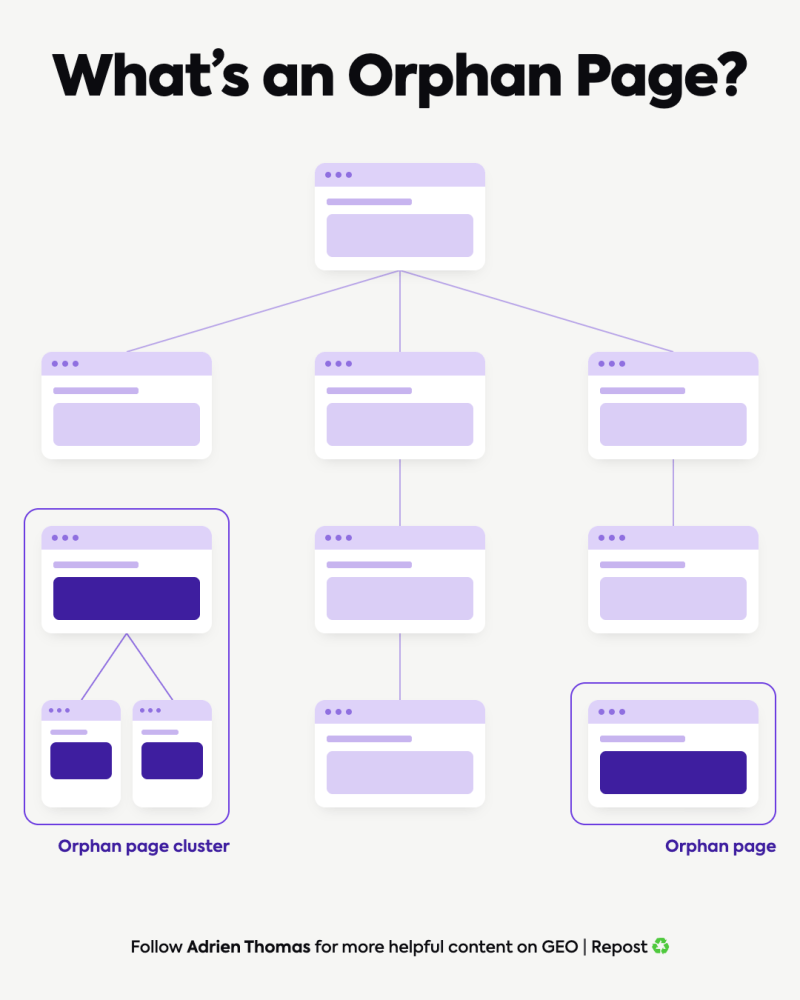
- It comes in two forms: the single orphan, and the orphan cluster, a group of pages linking to each other while the rest of the site ignores them.
- Pages without internal links get indexed slower, receive no authority from the rest of the site, and can’t be reached through normal navigation.
- Most orphan pages come from a workflow gap. Publishing counts as done, and connecting the page never gets assigned to anyone.
Orphan pages are pages on your website that nothing else links to. A page like this can be online, indexed, even pulling some traffic, and still be invisible inside your own site structure.
Google discovers and prioritizes pages mainly by following links, so a page without any will start every ranking race with a handicap. The fix costs almost nothing when it happens before publish. It gets expensive to untangle months later in an audit.
What orphan pages look like in practice
I run into this in almost every SEO/GEO audit we do at Crescendo. A company writes a blog post or builds a service page, publishes it, and moves on to the next brief. No existing page gets updated to point at the new one.
That page is now an orphan. It shows up in two forms:
- The single orphan page: one URL with zero internal links pointing to it. It sits in the sitemap, maybe ranks for a stray query, and nothing on the site tells a visitor or a crawler it exists.
- The orphan page cluster: a handful of pages linking to each other while staying cut off from everything else. From inside the cluster, everything looks connected. Zoom out and the whole group is an island.
Done on purpose, that same shape, several pages linking to each other, is what a content hub looks like. The difference is a hub also connects back out to the rest of the site. An orphan cluster never does.
Same root cause in both cases. The page went live, and nobody attached it to the site around it.
Why teams create orphan pages without noticing
Most publishing workflows end at “live.” Draft, review, publish, next brief. Adding internal links feels like a separate discipline, something the SEO person handles later if there’s bandwidth.
There rarely is bandwidth. The next deadline is already moving.
So the page stays where it landed: real, online, and disconnected, because nobody owned the step of linking it to anything else.
This is why orphan pages fill audit reports and never appear on a content calendar. No one plans them. They accumulate by default, one unlinked article at a time, and on large sites the pile grows fast.
Botify has published crawl data where over 70% of the pages Google explored on a single site were orphans.
Orphan pages and SEO: what an unlinked page costs
Three things go wrong when a page has no internal links, and Google’s own documentation confirms at least two of them.
- Indexing slows down, or never happens. Google’s developer docs state that it finds new pages primarily by following links from pages it already knows. A sitemap entry helps, but it’s a weaker signal than a place inside the actual link graph.
- The page earns no authority. Internal links carry SEO authority from one page to another. Zero inbound links means zero of that authority arrives, however good the content is. Google also reads internal links as a signal of how much a page matters, so a page with none, or with only 1 or 2, gets treated as low priority. On a big site, this is the usual reason a genuinely strong piece quietly underperforms.
- Nobody finds it by browsing. No navigation path means no discovery. The only visitors are people who already have the URL, which in practice rounds to zero.
A fourth angle deserves a flag, with less certainty than the three above. The academic paper that formalized Generative Engine Optimization (Aggarwal et al., 2024) measured that well-structured content can lift visibility in generative AI answers by up to 40%.
Industry write-ups keep reporting the same direction: interlinked topic clusters get cited by AI models more often than isolated pages covering the same subject. The specific numbers move around between sources, so treat them as directional.
The pattern itself holds, though. Any system judging whether your site is an authority on a topic reads roughly the same link structure a crawler does. A disconnected page reads as thin, and it reads like it belongs to no body of work.
How to find orphan pages you already have
The way to find them is a comparison. A crawler like Screaming Frog, Ahrefs Site Audit, or Sitebulb maps every page reachable through links. Your XML sitemap, Search Console, and analytics show every page that exists on the website. Any URLs present in the second group but missing from the first are orphans.
There’s a second, complementary check worth running: compare your crawl data against your server log files. A crawl shows what a tool like Screaming Frog can reach through links. Your logs show what Googlebot is actually requesting. Pages that show up in your logs but never turn up in the crawl are orphans a sitemap-and-analytics comparison alone would miss. Screaming Frog’s own log file analyzer is built for exactly this cross-check.
Run the crawl with sitemap crawling enabled, filter for URLs with zero inbound internal links, and export the list. On most SME sites, the whole exercise takes under an hour.
How much this matters scales with the numbers. A handful of orphaned pages is a quick, one-off cleanup. When orphan and near-orphan pages make up a real share of a site’s indexed URLs, it stops being a cleanup task and becomes something to flag as a standing item in every future audit.
How to fix them
An orphan isn’t automatically a page worth linking. Sort the list into 3 buckets:
| Type of orphan | Examples | Fix |
| Pages that matter | Service pages, strong articles that never got linked | Contextual links from related pages with descriptive anchor text, plus a navigation or footer link if the page is a core resource |
| Orphans on purpose | Campaign landing pages, thank-you pages, filtered views | Leave unlinked, add a noindex tag so they stop consuming crawl budget |
| Pages that shouldn’t exist | Thin duplicates, expired content | Merge and 301 into the closest living page, or delete and return a 404 |
Not every related page is an equally good source. A link from a page that already gets solid traffic passes more authority than one from another page nobody visits. When you have a choice, pick the busier page.
One more check worth doing at the same time: confirm the new link is actually crawlable, a real anchor tag Google can follow, not a JavaScript-triggered action or one carrying a nofollow attribute.
A few links, a few tags, done. Fixing orphan pages is usually the cheapest line item on an entire audit.
The 3-question check before you hit publish

Fixing old orphans is maintenance. Preventing new ones is a habit, and the habit is 3 questions per article:
- Which page links to it? If the answer is “none yet,” that’s a pre-publish task, not a someday task.
- What anchor text points to it? “Read more” gives a crawler nothing to work with. A descriptive anchor tells both people and search engines what sits behind the link.
- Which related page does it link back to? A new page should point outward too. Outbound connections turn a fresh article into part of a cluster instead of a new island.
Five minutes per article. Almost no publishing workflow includes it.
Closing thoughts
Orphan pages are one of the first things we check in every SEO/GEO audit at Crescendo, and the root cause is almost always the same: the workflow stops one step too early.
That missing step happens to be the cheapest fix on the whole list.
FAQ
-
What is an orphan page?
A page on your website with no internal links pointing to it. It can still be live, indexed, and receiving traffic, while staying unreachable through your site’s own structure.
-
Can orphan pages still rank in Google?
Yes, particularly with strong external backlinks or a sitemap listing. They compete at a disadvantage though: no internal authority reaches them, so they rarely hold strong search positions long term.
-
How do I find orphan pages on my site?
Compare a full crawl (Screaming Frog, Ahrefs Site Audit, Sitebulb) against your XML sitemap and analytics data. Pages that show up in the sitemap or traffic data but stay out of the crawl’s link graph are your orphans.
-
Do orphan pages hurt AI visibility too?
The evidence here is younger than on the Google side, but it points the same way. Interlinked, structured content gets cited in AI answers more often than isolated pages, based on both academic GEO research and industry observation.
-
How often should I check for orphan pages?
Quarterly for most sites, plus one check right after a migration, redesign, or a major batch of new articles. That’s when orphans get created fastest.