Turn an orphan-page fix into a commercial content hub
A technically indexable article may still fail to guide a relevant US B2B visitor toward the right service. Connect genuinely helpful resources to a capability page using natural, descriptive link text and avoid mechanical keyword repetition.
| Helpful article | Commercial next step | Why it helps |
|---|---|---|
| International SEO checklist | International SEO services | Implementation support for disconnected country pages |
| Query fan-out | AEO agency services | Convert buyer-question research into approved service-page changes |
| AI traffic measurement | AI visibility audit | Combine observable referrals with an answer and citation baseline |
Always check that linked destinations are genuinely useful, crawlable and canonical. Internal links do not guarantee rankings or AI citations.
What is an orphan page?
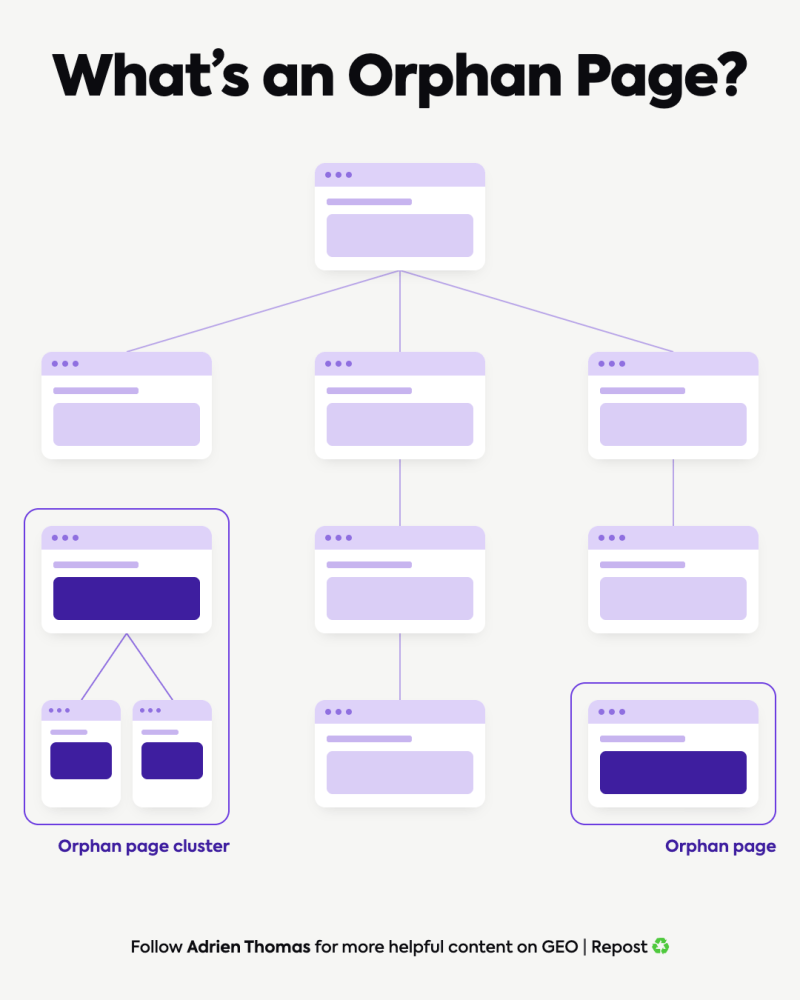
An orphan page is a URL with no incoming internal links from other pages on the site. It may still be found through a sitemap, an external link or a direct visit. Being orphaned does not by itself tell you whether the page is indexed.
A related problem is an orphan cluster: several pages link to one another but have no linking path from the main site. An audit must check reachability, not just whether each URL has an internal-link count above zero.
Why orphan pages matter for SEO
A useful page needs a place in the website. Incoming links help visitors find it and give search engines context about its relationship to other content. A disconnected page can miss those benefits even when its content answers a real question.
Does every published page get indexed? No. Google indexes only a small share of what gets published, so how pages connect to the rest of the site matters.
Orphan status is not proof of a penalty, and there is no universal ranking loss attached to it. External links, sitemaps and prior discovery may still bring crawlers or visitors to the URL. The practical question is whether the page should be part of the site’s normal user journey.
Orphan pages vs pages with few internal links
| Situation | What it means | What to investigate |
|---|---|---|
| Zero incoming internal links | A possible single orphan. | Compare the URL inventory with the crawl and inspect the page. |
| Links only from other disconnected pages | A possible orphan cluster. | Check whether any path connects the group to the main site. |
| One useful incoming link | Not necessarily orphaned or problematic. | Evaluate relevance and whether readers can reasonably find it. |
| Many links, but several clicks deep | A depth or navigation issue may exist. | Review paths from relevant hubs and service pages. |
How to find orphan pages
Orphan pages are often introduced during redesigns and repeated publishing cycles. Combine automated internal-link monitoring with periodic crawl-based checks to keep important destination pages reachable from useful contextual links.
Compare two inventories: the URLs reachable through internal links and the URLs known from other sources. No single source provides a guaranteed complete list of everything that exists.
- Run a link-based crawl from the homepage. Record the scope, exclusions and whether the crawler renders JavaScript.
- Collect other known URLs. Use a CMS export, XML sitemaps, Search Console landing pages, analytics and server logs where available.
- Normalise the comparison. Account for fragments, parameters, HTTP/HTTPS, trailing slashes and redirects without merging genuinely different pages.
- Find URLs missing from the link crawl. Treat them as candidates until you have checked crawl limits and access restrictions.
- Inspect incoming links and reachability. A URL discovered from a sitemap is not proof that another page links to it.
- Review the candidates manually. Record purpose, status code, canonical, indexing intention and the proposed action.
Screaming Frog’s orphan-page workflow supports comparing crawl data with additional URL sources. Other crawlers can support the same investigation, but check how each tool defines an orphan and where its URLs came from.
How to find orphan pages on a website with Screaming Frog
Compare a link crawl from the homepage with independent URL sources. The official integrated workflow requires the relevant licence and access.
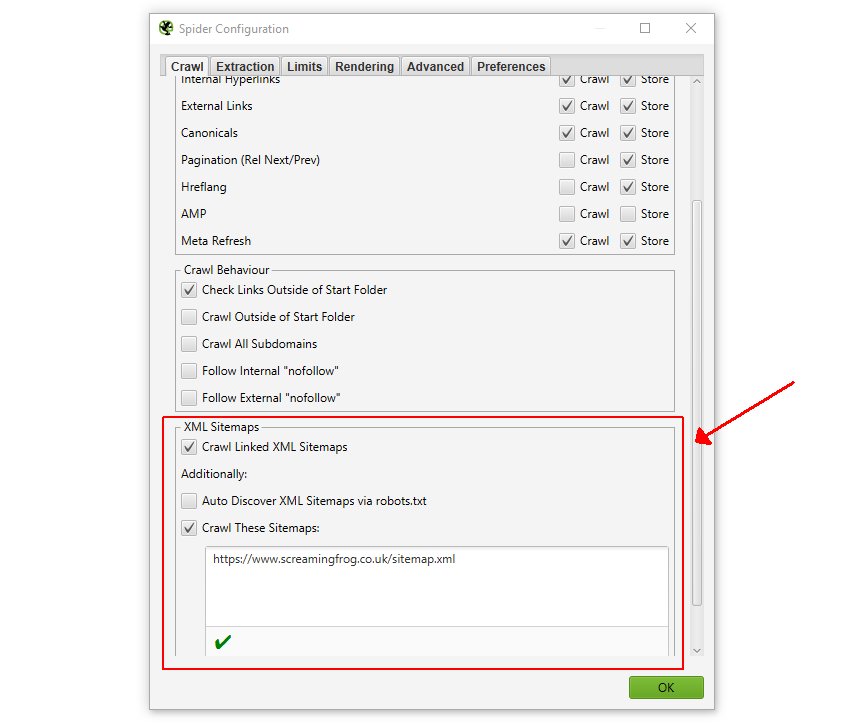
- Enable Crawl Linked XML Sitemaps in the spider configuration.
- Add Search Console or analytics sources where available, including the option to crawl newly discovered URLs.
- Complete the crawl, then run Crawl Analysis.
- Review the orphan filters and the combined orphan report. Check how each candidate was discovered.

How to check orphan pages in Ahrefs
In Site Audit, include the sitemap and other known URL sources, complete the crawl and review the orphan-page issue under Links. Ahrefs flags URLs without incoming internal links among the URLs it discovers. Inspect candidates and their intended role before changing them. See the official issue definition.
Which orphan page checker should you use?
| Method | Inputs | Limitation |
|---|---|---|
| Integrated crawler | Homepage crawl plus sitemap, analytics or Search Console sources. | Configuration, crawl scope and licence affect discovery. |
| Ahrefs Site Audit | Project crawl and additional known URLs. | Unknown URLs cannot be diagnosed simply because they exist. |
| CMS export + spreadsheet | Published URL inventory and a complete link-crawl export. | Manual normalisation and review are needed. |
For a small site, compare known URLs in column A with crawled URLs in column B using =IF(COUNTIF(B:B,A2)=0,"Review","Found"). Check URL variants and crawl exclusions before classifying a result as an orphan.
Common causes and false positives
Pages become disconnected after migrations, menu changes, expired campaigns and publishing workflows that stop at “publish”. Regional versions can also lose their connections when a language selector or local navigation changes.
Before changing a page, rule out an incomplete crawl. An excluded directory, authentication requirement, JavaScript rendering issue or crawl limit can make a reachable page appear missing. Analytics and Search Console may omit pages with no recorded activity; a sitemap may include old redirects or URLs that should not be indexed.

Free orphan-page checker: a spreadsheet method
A single crawler cannot discover a page that no linked URL leads to. To find potential orphan pages, combine at least two independent lists: URLs known to the website (XML sitemaps, Analytics landing pages, Search Console pages or the CMS export) and URLs found by a crawl starting at the homepage.
- Export canonical indexable candidate URLs to a sheet named Inventory, one URL per row in column A, starting at A2.
- Crawl the website from the homepage with a tool that follows internal links. Export its exact discovered URLs to a sheet named Crawl, column A.
- Normalise the two lists first: use the same scheme, hostname, trailing slash and URL encoding; remove URL fragments and noncanonical variants as appropriate.
- In Inventory!B2 paste the formula below and fill down. It flags inventory URLs not found in the crawl; it does not on its own prove zero internal inlinks.
=IF(COUNTIF(Crawl!A:A,A2)=0,"CHECK","FOUND")For each CHECK row, inspect its HTTP status, robots directives, canonical, navigation path and incoming links in the crawler. If it is a useful indexable page, add an editorially relevant link from a crawlable page. If it is obsolete, consolidate or redirect only after checking the correct destination. If it is intentionally isolated or excluded, document that choice instead of forcing unnecessary links.
| Result | Interpretation | Next action |
|---|---|---|
| In sitemap, absent from crawl | Potentially orphaned or blocked from discovery | Check internal inlinks and accessibility |
| In crawl, no useful navigation path | Discoverable but possibly buried | Consider contextual links or hub inclusion |
| Canonical points elsewhere | May be duplicate or alternative URL | Review canonical target before adding links |
| Noindex by design | Not a target for organic indexation | Check the decision rather than assume an error |
To prevent repeat issues, link new articles from a relevant hub at publication time. See our XML sitemap guide and sitemap analysis workflow for examples of inventory discovery.
How to fix orphan pages
| Page purpose | Appropriate action |
|---|---|
| Useful service page or article | Add a contextual link from a relevant reachable page; connect supporting resources where useful. |
| Useful page overlapping another resource | Assess consolidation. If content is merged, redirect only to a relevant replacement and update internal links. |
| Retired page with no suitable replacement | Remove it deliberately and return an appropriate 404 or 410 response. |
| Intentional campaign or utility page | Decide its navigation and indexing role separately; it may legitimately remain outside the main site structure. |
Do not apply noindex to every orphan. If a page should not appear in search, review the indexing directive deliberately; noindex is not a crawl-budget shortcut. Do not block crawling and assume the crawler can still read a new directive on the page.
Choose source pages because their readers need the destination. A popular but unrelated article is not automatically the best place for the link. Use crawlable links and descriptive anchors, then verify that the link reaches the intended live URL.
Need a refresher on internal linking? This short lesson covers how links make content reachable for readers and search engines.
How to fix orphan pages in WordPress
- Confirm the destination: open the live URL and check its purpose, status and intended canonical.
- Choose a source: find a relevant article or service page already reachable through the site.
- Edit the source: use the normal WordPress or builder editor to add a contextual link where the reader needs the information.
- Publish and check: click the link on the public page and confirm that it reaches the intended destination.
- Re-crawl: verify a path from the main site and record the repaired source and destination.
If the content is obsolete, assess consolidation or removal instead. Redirect only to a relevant replacement. A broken outgoing link is a different issue from a working page with no useful incoming path.
When consolidating or retiring URLs, use 301 redirects only where a permanent and relevant replacement exists.
Before
A published service guide exists, but the relevant category and articles do not link to it.
Repair
Add a descriptive link from a reachable article where readers need the service explanation.
Verify
Follow the link on the public site, then confirm the destination is reachable in a new crawl.
Illustrative linking pattern. Use a relevant source; adding arbitrary links solely to increase the count is not the objective.
A practical internal-linking example
A guide about international expansion can link to an international SEO checklist where it discusses launch checks. The checklist can link to the international SEO service when a reader needs implementation help. Both belong within the wider site, rather than forming an isolated pair.
Similarly, a query fan-out guide can explain why related questions deserve connected resources. A content hub gives those resources a navigable structure; linking every article to every other article is unnecessary.
Adding a URL to an llms.txt file does not create a contextual link from an established HTML page. Repair the normal navigation path as well as reviewing any machine-readable files.
Deciding whether to link, consolidate or remove an orphan page
Not every URL without a crawlable internal link deserves promotion. Decide whether it serves an identifiable reader or commercial purpose before adding navigation links.
- Keep and link: useful, current and indexable content with a clear parent page; add contextual links from relevant pages.
- Consolidate: overlapping pages that answer substantially the same question; preserve useful material and choose a canonical destination.
- Retire deliberately: obsolete URLs without a worthwhile replacement; assess redirects, 404/410 handling and existing backlinks before removal.
- Exclude from the audit: intentional utility, checkout or private pages that should not be promoted in search.
XML sitemap inclusion does not prove a page has internal links. See our sitemap analysis guide and international internal-linking checklist.
Verify the fix and prevent recurrence
- Re-crawl the relevant section and confirm a path from an established page.
- Check the anchor, destination, status and canonical rather than only the link count.
- Add an incoming-link task to each publishing brief.
- Assign responsibility for updating existing pages when new content goes live.
- Repeat the audit after migrations, large publishing batches and navigation changes.
An orphan-page review should also inform broader editorial decisions. The SEO content audit framework explains when to preserve, improve or consolidate a URL, while our website migration SEO checklist covers navigation and internal-link checks around a launch.
Frequently asked questions
Does a sitemap fix an orphan page?
A sitemap can help discovery, but it does not create a navigable internal link from another page.
Can an orphan page rank?
Yes. Orphan status alone does not determine indexing or rankings. Review whether the page deserves a useful place in the site.
Do internal links guarantee AI citations?
No. They improve the site’s connections and help readers reach supporting material. An AI citation remains a separate outcome to observe.
Need help repairing your site structure? Discuss an SEO audit with Crescendo, including the pages you want customers to find and the routes they should use.