
TL;DR
- Hitting publish puts a page on your server and does nothing else. Googlebot finds new pages mainly by following links from pages it already knows.
- A crawlable link is an <a> HTML element with an href attribute pointing to a real URL. Google’s documentation states that most other formats won’t be parsed by its crawlers.
- Google Search runs in 3 stages: crawling, indexing, ranking. A page that fails at stage 1 never gets judged at stages 2 and 3.
- AI crawlers (GPTBot, ClaudeBot, PerplexityBot) follow the same link paths and execute zero JavaScript. Clean HTML links matter even more for GEO than for SEO.
- 4 pre-publish checks cover most of the discovery risk: which page links to the new one, whether that link is crawlable, whether the anchor text describes the target, and where the new page links onward.
Crawlable links are the paths search engines and AI platforms follow to find your pages. Publishing creates a URL on your server; discovery is a separate step, and it runs on links that crawlers can actually parse.
Googlebot, and now GPTBot and ClaudeBot, reach new content mainly by moving from a page they already know to yours through a standard HTML link. Without one, your new page has no reliable way of being found, whatever its quality.
How crawlers discover your pages
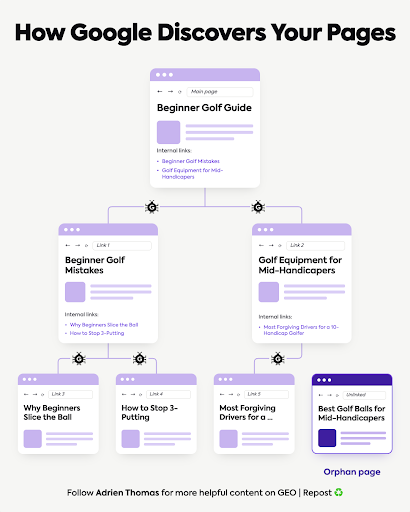
Google maintains a list of URLs it already knows about. Googlebot visits those pages, reads them, and follows the links it finds to reach URLs it hasn’t seen yet. Google’s documentation calls this URL discovery, and links from known pages are its main mechanism.
A simple example:
- Your homepage carries 2 internal links.
- Googlebot follows them and lands on those 2 pages.
- Each contains more links, so the bot keeps moving toward pages 3, 4, and 5.
Your internal links are the routes crawlers take through your site. Google’s link documentation goes further: every page you care about should receive a link from at least 1 other page on your site.
Distance from the homepage matters too. Pages reachable within a few clicks of it tend to get crawled more often and indexed faster than pages buried several links deep. If a page matters, the path to it should be short, not just present.
Submit a sitemap too, it declares your URLs to Google. Internal links do a job the sitemap can’t, though. A link from your pricing page tells Google the target relates to pricing. A sitemap entry only confirms the URL exists.
The extreme case is the orphan page: published, live, and with zero internal links pointing at it. I’ve covered those in a separate article.
Crawling and indexing are separate gates (ranking is a third)
Google Search works in 3 stages:
- Crawling: Googlebot finds the page and fetches it.
- Indexing: Google analyses the content and decides whether it enters the index.
- Ranking: Google decides whether the page should appear for a given search.
Each stage is its own decision, and Google says so explicitly in its documentation. Getting crawled doesn’t guarantee getting indexed. Getting indexed doesn’t guarantee ranking.
The order is the point. A page that fails at crawling never reaches the other 2 gates, because the search engine can’t evaluate content it struggled to find.
Crawlability comes first in every technical audit we run at Crescendo for the same reason: everything else builds on top of it.
What counts as crawlable links: Google’s exact rule
Google’s Link Best Practices documentation gives “crawlable” a precise definition: an <a> element with an href attribute that resolves to a real web address. Links inserted by JavaScript still count, as long as they end up in that exact markup.
Plenty of modern sites break the rule without noticing. Users click a button or a card, land on the page, and everything looks fine. The crawler saw no link at all.
Google’s own documentation lists the patterns on each side of the line:
| Link pattern | What it is | Crawlable? |
| <a href=”https://example.com”> | Standard HTML link, absolute URL | Yes |
| <a href=”/products/shoes”> | Standard HTML link, relative URL | Yes |
| <a href=”/shoes” onclick=”…”> | Real href plus a script event | Yes |
| <a routerLink=”products”> | Framework attribute, no href | Unreliable |
| <span href=”https://example.com”> | Wrong element, not an anchor | Unreliable |
| <a onclick=”goto(‘example.com’)”> | Navigation lives in the script, no href | Unreliable |
| <a href=”javascript:goTo(‘shoes’)”> | The href holds code, no real URL | Unreliable |
“Unreliable” is Google’s own framing: it may still attempt to parse these, and you shouldn’t build your site on “may.”
One question to your developer settles this without reading any code: are our internal links standard <a href> links? If the site runs on a JavaScript framework, add a second: do those links exist in the initial HTML the server sends?
4 mistakes that quietly break crawl paths
The table covers markup that never worked. These 4 failures are sneakier, because the markup is correct and the path still dies:
- Broken links. The destination returns a 404 or another error. In Google’s URL Inspection reporting, those URLs show up as crawl failures: the bot followed the path and hit a dead end.
- A nofollow pointing at your own pages. Google’s documentation says paths marked rel=”nofollow” are generally not followed. The value exists for distancing yourself from outbound destinations, sponsored placements, and user-generated spam. Used on your own navigation, it tells the search engine to skip content you want found.
- A robots.txt block on the destination. The path can be perfect while robots.txt disallows the target URL. Google’s guidance splits the jobs precisely: a disallow rule prevents the fetch, while noindex (with crawling allowed) prevents indexing. Disallow rules left over from a staging setup are a classic way to cut entire sections off.
- A thinner link set on mobile than desktop. Google indexes the mobile version of a site by default. If the mobile template drops navigation links or trims a menu down, whatever depends on those links stops getting discovered, even though the desktop version looks fine.
How to find and fix crawlability issues
View the source of a page (right-click, “View Page Source”) and search for the URL of the page you expect it to link to. The raw source is what matters, because that’s what the server sends before any script runs. The rendered view in your browser’s inspector can show links that never existed in the initial HTML.
For a full picture, 2 free tools do the heavy lifting. A crawl with JavaScript rendering switched off, in Screaming Frog or similar, exposes every URL unreachable through plain HTML paths.
And Google Search Console’s URL Inspection tool shows a specific URL the way Google sees it: the Discovery section lists how the URL was found, including the referring pages, and the Crawl section shows whether the fetch worked and what got in the way.
When something’s off, the fix runs as 1 loop:
- Identify the URL that isn’t getting crawled, from the Page indexing report or your own crawl.
- Diagnose which failure it is: no page points at it, the markup isn’t parseable, a nofollow sits on the path, robots.txt blocks the fetch, or the destination errors out.
- Fix that specific cause.
- Re-run the URL Inspection live test to confirm, and request indexing while you’re there.
Each fix hands search engines another route into your site, and the pages bots reach reliably are the ones that make it through indexing and into results. The same loop serves SEO and GEO, since AI bots read the same HTML.
AI crawlers follow the same paths, with less patience

Everything above applies to GEO, with 1 difference that makes the rules stricter.
AI crawlers discover content the way Googlebot does: fetch HTML, follow links. The scale is already real. On Vercel’s network alone:
- GPTBot generated 569 million requests in a single month.
- ClaudeBot followed with 370 million over the same period.
- Combined, that’s about 20% of Googlebot’s volume.
JavaScript is where they diverge. Googlebot renders pages with a headless Chrome browser and executes JavaScript before extracting links. GPTBot, ClaudeBot, and PerplexityBot read the raw HTML and move on. In Vercel’s analysis, ClaudeBot downloaded JavaScript files in about 24% of requests and executed them exactly zero times.
So a page reachable only through JavaScript navigation stays invisible to ChatGPT, Claude, and Perplexity. It also means every one of the searches inside a single query fan-out needs its own crawlable path, not just the page a user’s original question might point to.
If AI platforms are a channel you care about (I’ve written before about how well that traffic converts), your links and content need to sit in the raw HTML your server sends.
The 4 checks before you publish
Before a new article or service page goes live, 4 checks cover most of the discovery risk:
- Which existing page links to it? Pick one crawlers already visit often, a category page or a related article.
- Is the link crawlable? Standard HTML link, href attribute, real URL.
- Does the anchor text describe the page? “Read our guide to internal linking” tells crawlers and readers what to expect. “Click here” tells them nothing, and Google’s documentation flags generic anchors as exactly that. For image links, the image’s alt text does the anchor’s job, so write it as one.
- Which related pages should the new page link to? Discovery runs both ways. The new page should send crawlers onward to the pages it belongs with, exactly the logic behind building a content hub instead of publishing isolated pieces.
A few minutes per page. If the page matters, give the bots a clear path to it.
FAQ
-
What is a crawlable link?
An <a> HTML element with an href attribute pointing to a resolvable URL. That’s the format Google’s documentation defines as reliably parseable. Buttons and click handlers that navigate through JavaScript alone may never be processed as links.
-
How do you check if your links are crawlable?
View the page source and confirm the target URLs appear inside <a href> elements in the raw HTML. For a site-wide check, run a crawl with JavaScript rendering disabled and compare what it finds against your sitemap.
-
What’s the difference between crawling and indexing?
Crawling is Googlebot finding and fetching a page. Indexing is Google analysing it and deciding whether to store it. They’re separate decisions: Google confirms in its documentation that a crawled page isn’t guaranteed a place in the index.
-
Do AI crawlers execute JavaScript?
No. Vercel’s analysis found GPTBot and ClaudeBot download some JavaScript files and never run them, while Googlebot renders pages with a headless Chrome browser. Links and content that only appear after client-side rendering stay invisible to AI crawlers.
-
Is a sitemap enough for a new page to get discovered?
A sitemap declares your URLs and submitting one is good practice. Internal links carry what it can’t: context about how pages relate, and a signal of which pages on your site matter.