
TL;DR
- Most websites publish articles as standalone pieces: one page per topic, no connection between any of them.
- A content hub is one hub page on a broad topic, linked to cluster pages that answer narrower related questions, tied together with descriptive internal links.
- The same model goes by several names in the SEO industry: hub and spoke, pillar page and topic cluster, content hub. Same structure underneath.
- AI engines lean on that structure to work out what a page is about and how it relates to the rest of your site.
- A content hub organizes content you already have. It won’t rescue weak content.
A content hub is a hub page covering a broad topic, connected to cluster pages that go deeper on specific related questions, all held together by internal links with descriptive anchor text. Most websites don’t have one.
They have individual articles that each answer one question and then sit there, disconnected from everything else on the domain. That gap costs rankings in Google search, and it now costs citations in AI answers too.
The most common mistake I see: articles that fight alone
We audit websites every week at Crescendo, and this pattern shows up almost every time:
- One article about topic A.
- Another about topic B.
- A third answering a related question that surfaced in someone’s keyword research.
Each page can be genuinely useful on its own.
What’s missing is everything between them. No hub page pulling the topic together. No cluster pages branching off it. No internal links between related pieces. And when a link does exist, the anchor text is usually “read more” or “click here,” which tells a reader, and a crawler, almost nothing about the destination.
The result: every article fights alone. Nothing reinforces anything else.
What a content hub actually is
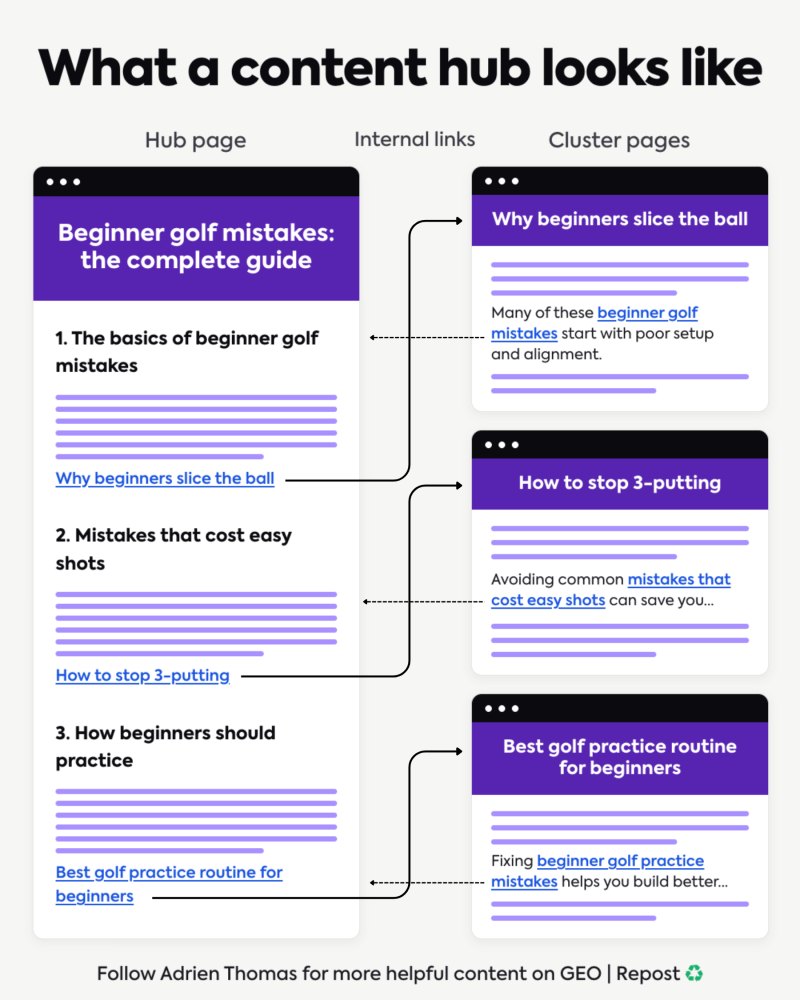
A content hub has two parts.
- The hub page. It covers the broad topic and acts as the entry point, the page you want ranking for the main term.
- The cluster pages. Each one answers a specific, narrower question related to the hub topic. A broader piece on SEO risk might anchor a narrower page like whether negative SEO is illegal. A cluster page skips the full overview and goes deep on one thing.
Internal linking holds the structure together. The hub links out to every cluster page. Cluster pages link back to the hub, and to each other where it makes sense. The anchor text is descriptive: something like “why beginners slice the ball” or “how to stop 3-putting,” never “click here.”
There’s no fixed quota, enough links to connect the structure without crowding the page. None of this works if the links themselves aren’t crawlable in the first place, a separate, lower-level check worth running alongside the hub structure.
As a rough starting point, hub pages should be broad enough to comprehensively cover the head term, longer than any single cluster page beneath them, though real examples vary widely by topic and competition.
Ahrefs’ own pillar pages, for instance, break broad topics into clearly linked chapters rather than hitting a fixed word count. Cluster pages stay leaner, focused enough to fully answer one question without drifting into the hub’s territory.
Picture a golf content hub:
- The hub page is “Beginner Golf Mistakes: The Complete Guide.”
- The cluster pages go deep on individual mistakes: why beginners slice the ball, how to stop 3-putting, the best practice routine for beginners.
- Every cluster page links back to the hub, the hub links out to every cluster page. That’s the whole structure.
You’ll see the same model under different names. HubSpot calls it a pillar page with a topic cluster around it. Plenty of marketing agencies call it hub and spoke. The vocabulary changes, the architecture doesn’t: one broad page, several deep pages, deliberate links between them.
Simple on paper. Almost nobody builds hubs consistently.
Why content hubs matter more now that AI engines read your site
This started as a Google ranking concern, and it still is one. It has also become an AI visibility concern, for a reason that’s easy to miss.
An AI engine crawling your site needs to work out three things:
- What a page is about.
- How it relates to your other pages.
- Which specific page is the right source for a specific question.
That last point connects to query fan-out: AI systems often split one question into several underlying searches before answering, and a well-structured hub gives them more of those searches to match against.
A standalone article gives it none of that context. A connected hub gives it all of it.
HubSpot popularized this model back in 2017, restructuring its own blog of more than 12,000 posts around it. The logic at the time was purely about SEO rankings: internal links between a pillar page and its cluster pages signal a semantic relationship, and that signal builds topical authority over time.
The same logic now drives what AI platforms cite. A brand that covers a subject through a structured hub, rather than scattered one-off posts, gives ChatGPT, Perplexity, and AI Overviews a clearer basis for deciding which of your pages is the authoritative source on a given question.
Google’s own internal linking documentation makes the point the golf example makes: anchor text should describe the destination. “Click here” tells a crawler nothing. “How to stop 3-putting” tells it exactly what sits behind the link and how it fits the page it came from.
A content hub doesn’t fix weak content

None of this replaces the actual work.
A content hub structure won’t save thin pages, outdated information, or an article with nothing new to say. It can’t manufacture authority you haven’t earned, and it can’t substitute for fresh data, real expertise, or third-party mentions of your brand.
What a hub does is stop your good content from working in isolation. If your best articles currently stand alone, your site is harder to understand than it should be, for AI systems and for readers.
Your content hub strategy starts with what you already have
Building a hub rarely means starting from zero. The faster path runs through your existing library:
- Inventory what’s published. Group your existing articles by topic. Search Console and analytics help you spot which pages already earn clicks, and those are candidates worth building around. Also identify orphan pages before mapping the cluster, so useful content is not left outside the structure.
- Pick the hub page. Find the piece broad enough to own the main topic. A broad, evergreen piece, a history of SEO is a good example, often already exists and just needs the supporting pieces linked into it. If nothing qualifies, that’s the one page you create from scratch.
- Map the cluster. Assign each related article to the central page it supports. Gaps in coverage will become your next briefs, already prioritized.
- Plan the links before writing anything new. A simple spreadsheet mapping which page links where, with what anchor text, beats improvising a link every time something publishes.
Most sites we audit already own half a content hub without knowing it. The articles exist. The structure was just never built.
The two questions to ask before you publish your next article
Before the next piece goes live, answer these two questions:
- Is this the hub page, or a supporting page?
- And which pages should it link to, which pages should link back to it?
If the answer takes more than a minute, you probably have a blog article library: a pile of individual pieces that were never designed to work together.
This is one of the most common gaps we find in client audits at Crescendo. The content itself is often fine. The structure connecting it is what’s missing, and adding it is usually a bigger, faster win than writing more content.
FAQ
-
What is a content hub?
A content hub is a hub page on a broad topic connected to cluster pages that go deeper on specific, related questions. Internal links with descriptive anchor text tie the structure together.
-
What’s the difference between a content hub, a pillar page, and a topic cluster?
Mostly vocabulary. A pillar page is the hub, the topic cluster is the set of supporting pages around it, and “hub and spoke” describes the same wheel shape. Different names, one architecture.
-
Does a content hub replace the need for good content?
No. A hub organizes and reinforces content that’s already strong. It won’t fix thin, outdated, or low-authority pages.
-
Can an existing article become a hub page?
Yes. Many sites already have a piece broad enough to serve as the hub. The work is identifying it and linking existing related content into it, rather than starting from scratch.
-
What’s the first step of a content hub strategy?
Audit what you already have. Group existing articles by topic, identify which one can carry the broad term, and map the internal links needed to connect the rest to it.