Key Takeaways
- When SEO stalls, the cause is usually one of 5 SEO problems: technical access, search intent, topic depth, external authority, or traffic that can’t convert. Each one needs a different fix.
- 50 new articles on a website Google can’t properly index are worth nothing. Start in Google Search Console, before you touch the content calendar.
- A page can be well written and still rank for nothing because it answers the wrong intent. For “best X” searches, Google tends to rank comparison guides above product pages.
- Ahrefs found referring domains had a 0.255 correlation with rankings across 1 million keywords, the strongest link metric it tested. What other sites say about you counts.
- The same 5 checks shape whether ChatGPT, Gemini, and Google AI Overviews recommend you.
If you’re asking “why is my SEO not working?”, the cause is usually one of 5 SEO problems, and more content only fixes one of them. Find the one that applies to your site, fix it, and only then work on how to increase organic traffic. That order can save you months of work.
Why Is My SEO Not Working When I Keep Publishing?
Your traffic has been flat for 6 months, and the advice is always the same: write more articles, build more backlinks, or rebuild the website. Often the problem has nothing to do with content:
- A page Google can’t index.
- Thousands of visits from people who will never buy.
- A product page where Google expects a comparison guide.
Each of these needs a different fix, and publishing more solves none of them.
Romain, Crescendo’s co-founder, has 15 years of SEO behind him. He breaks the diagnosis into 5 checks, in this order: technical access, search intent, topic depth, external authority, and business relevance. Each check rules out one cause, and skipping ahead usually means fixing something that wasn’t broken.
“If the issue is technical, producing more content won’t solve it. If the issue is authority, rewriting your own page won’t solve it. And if the traffic itself has no commercial value, ranking higher may not solve anything either.”
Romain, co-founder of Crescendo
First, Check That the Drop Is Real
Before you diagnose anything, make sure the numbers mean what you think:
- Compare 2 sources. If your analytics shows a drop but Google Search Console clicks are stable, it may be a tracking issue.
- Compare the same period last year. Some businesses are simply seasonal.
- Check the date against Google’s updates. If the drop started during a core update, Google’s Search Status Dashboard lists when each ranking update rolled out. Core updates are broad: they “don’t target specific sites or individual web pages.” Wait at least a full week after one finishes before you analyse the drop, as the core updates guide recommends. A drop doesn’t always mean something is wrong with your pages. Others may simply answer the query better.
- Look at clicks and rankings separately. Rankings can hold while clicks fall, because the search page itself changed. Ahrefs analysed 300,000 informational keywords and found that an AI Overview in the results correlated with a 34.5% lower click-through rate for the top-ranking page.
If the drop survives those 4 checks, move on to the 5 below.
Check 1: Why Is My Website Not Showing Up on Google?
Before you rewrite pages or chase backlinks, check whether Google can access and index the site at all.
Google Search Console is the place to look. Its Page indexing report lists the pages Google hasn’t indexed and why, with reasons like:
- A noindex tag tells Google not to index the page, sometimes left in place by accident after a redesign.
- “URL blocked by robots.txt” means a robots.txt rule stops Google from crawling the page.
- “Redirect error” covers redirect chains that are too long, loops, and redirects to broken URLs.
- “Duplicate without user-selected canonical” means several versions of the same page exist, and Google had to pick which one counts.
2 more things to check here. Google “uses the mobile version of a site’s content” for indexing and ranking, so content missing from your mobile pages counts as missing. Check your key pages on mobile, not only on desktop. And pages with no internal links pointing to them, called orphan pages, are hard for Google to find at all.
A website migration can also remove pages that brought traffic, and the loss often goes unnoticed until the numbers drop.
Search Console is free. For a full crawl, tools like Screaming Frog (free for up to 500 URLs), Ahrefs Site Audit, or Semrush Site Audit flag every broken link, redirect chain, missing title tag, and page blocked from indexing.
You don’t need to understand every technical detail. Ask your SEO team one question: is anything stopping Google from accessing, indexing, or trusting this website? If the answer is yes, that’s the first problem to fix.
Check 2: Does Your Page Match the Search Intent?
A page can be well written and still rank for nothing, because it answers a different question from the one being searched.
Someone searching “best accounting software for small businesses” is comparing options. If your page is a product page about your own software, Google will rank comparison guides, reviews, and pricing pages above it, because that’s what the user wants.
Ahrefs groups searches into 4 intents: informational, navigational, commercial investigation, and transactional. A product page answers a transactional or navigational search. “Best X” searches are commercial: the searcher is still comparing and not ready to pick a brand.
To check, search your target keyword and look at what already ranks. Then ask whether your page offers the same type of answer, or a better one.
Check 3: Does Your Content Show Enough Depth?
Say you want visibility for cybersecurity services. You have one page, “Cybersecurity Services.” Your strongest competitor has that page plus content on ransomware, compliance, penetration testing, cloud security, incident response, audits, and regulatory updates.
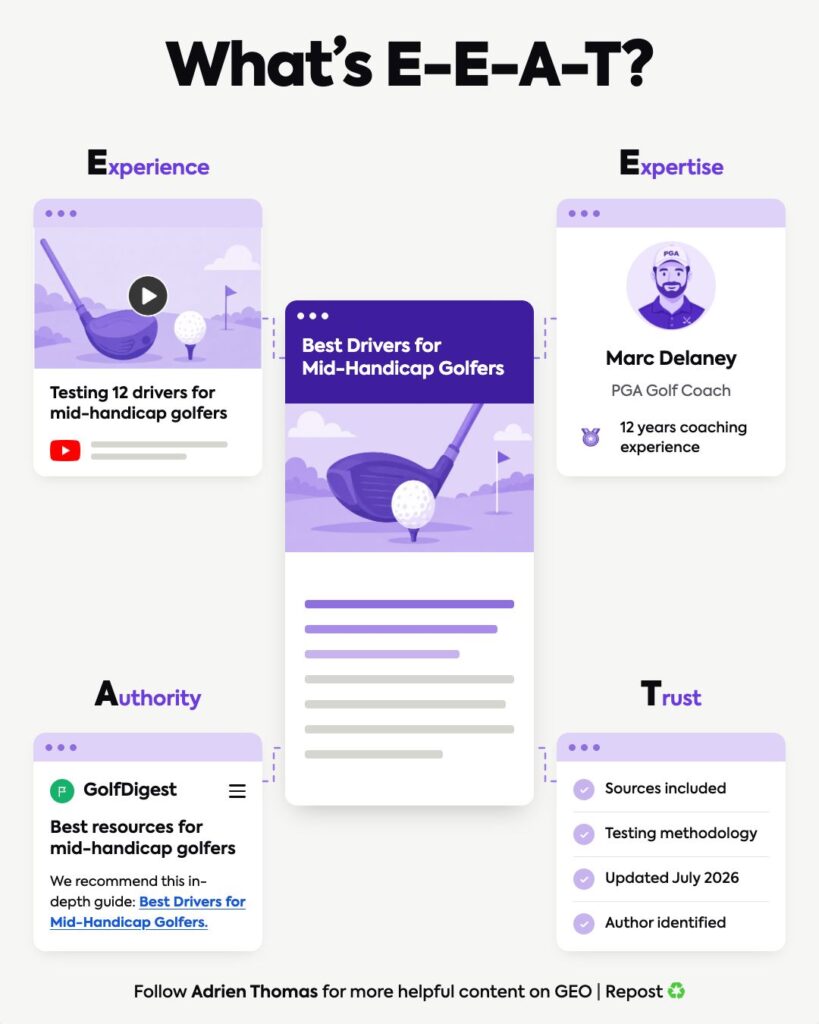
From a search engine’s point of view, that competitor shows more expertise on the topic. In December 2022, Google added “Experience” to E-A-T in its quality rater guidelines, and the guidelines call trust “the most important member of the E-E-A-T family.” Covering a topic in depth is one of the clearest ways to show expertise and earn that trust.
Depth also wears out. A page that ranked 2 years ago can slip as competitors publish newer, more complete versions, so check whether your best pages are still the most useful answer for the user.
Keep the fix targeted. Build your content strategy around the areas where your company actually has expertise, and show what you already know.
Check 4: Does the Web Trust You Beyond Your Own Site?
Picture 2 companies with similar websites. Company A has industry media mentions, customer reviews, backlinks, and expert interviews. Company B has almost none of that. Company A ranks higher, which is what you’d expect.
Backlinks are part of it. In a January 2025 study of the top 1 million US keywords, Ahrefs found that the number of referring domains correlated with rankings at 0.255, the highest of the link metrics it tested (total backlinks came in at 0.248). A correlation doesn’t prove links cause rankings, but it points the same way as the example above.
Ask what evidence exists outside your website that your company is credible. Mentions, reviews, and links from other websites are that evidence, and more content on your own site can’t replace them.
Check 5: Can Your Traffic Become Business?
Ranking for informational keywords like “what is cybersecurity” can bring thousands of visits, mostly from students and curious readers. “Cybersecurity consulting for banks” brings far fewer, and they’re worth far more.
Informational searches teach someone something. Commercial and transactional searches move someone toward a decision. Confusing the two means celebrating a traffic graph that never turns into leads.
Measure leads and revenue, not only visits and rankings. Being visible to the right people is the goal.
The 5 SEO Problems at a Glance
| SEO problem | Typical symptom | Where to check | What fixes it | What won’t |
|---|---|---|---|---|
| Technical access | Pages missing from Google, sudden drops after a migration | Search Console, Page indexing report | Fixing noindex tags, robots.txt rules, redirects, canonicals | More content |
| Search intent | Good page, no rankings | The current top 10 for your keyword | Matching the type of page Google ranks | Rewriting the same page type |
| Topic depth | Competitors rank with broader coverage | Competitors’ content on the same topic | Targeted content where you have real expertise | Generic articles at volume |
| External authority | Similar content, competitors still outrank you | Referring domains, reviews, media mentions | Earning mentions, reviews, and links | More on-site content |
| Business relevance | Traffic grows, leads don’t | Analytics conversions by page | Targeting commercial and transactional searches | Higher rankings on informational terms |
These Same SEO Problems Decide AI Visibility
ChatGPT, Gemini, and Google AI Overviews look for similar signals before recommending a company:
- Can they read and understand the website?
- What is the company an expert in?
- Do third parties trust the brand?
- Is there enough evidence to recommend it?
The fundamentals stay the same: a website they can read, content with real depth, a brand others trust, and evidence on other sites. Visibility is now spread across more platforms.
How to Increase Organic Traffic Once You Know the Bottleneck

Once you’ve found the check that fails, fix that one first and leave the others for later:
- Run the 5 checks in order, starting with technical access.
- Stop at the first one that fails. That’s your bottleneck.
- Fix it, then give Google time to recrawl and re-evaluate the affected pages.
- Measure the result in leads and revenue, as well as clicks.
- Move to the next check.
This is how to increase organic traffic without guessing. Each fix removes a real limit on growth, and new content starts working once the site underneath it can support it.
Expect SEO results to take time. The core updates guide says some changes “can take effect in a few days, but it could take several months” for the systems to confirm the site as a whole has improved. Technical fixes usually show first, because the pages only need recrawling. Content and links take longer.
Then keep watching. Check Search Console every month for new indexing errors, pages that lose clicks, and rankings for each target keyword, and rerun the 5 checks after every redesign, migration, or core update. That’s how you know your SEO is working.
“We’d rather spend a week diagnosing the actual bottleneck than 6 months producing content for the wrong problem.”
Adrien Thomas, co-founder of Crescendo
Find Your Bottleneck This Week
Run the 5 checks against your own website this week, starting with the Page indexing report in Search Console. Whichever check fails first is where you start.
That’s the process we follow with clients at Crescendo: diagnose first, then fix one thing at a time. If you want us to find the bottleneck on your site, contact us at Crescendo.
FAQ
Why is my SEO not working even though I keep publishing content?
The bottleneck is probably somewhere else: technical access, search intent, topic depth, external authority, or traffic with no commercial value. More content only helps when content is the actual problem.
Why is my website not showing up on Google?
Usually because Google can’t crawl or index it. Check the Page indexing report in Google Search Console for pages excluded by a noindex tag, blocked by robots.txt, redirected, or treated as duplicates.
What are the most common SEO problems?
The 5 we check first: pages Google can’t index, pages that don’t match the search intent, thin coverage of the topic, weak authority on other websites, and traffic that doesn’t convert.
How do I increase organic traffic?
Find the bottleneck before you publish more. Fix technical access first, then intent, depth, and authority, and measure the result in leads, not only visits.
How do I know if my SEO is working?
Look at 3 things together: clicks and impressions in Google Search Console, rankings for the searches your buyers use, and leads and revenue by page. Rising traffic with flat leads means the traffic isn’t the right kind.