
TL;DR
- A meta description is a short summary of a page, written into the HTML head. It’s invisible on the page itself.
- Google treats it as one possible ingredient for the search snippet. The page’s own content comes first, ahead of it.
- Ahrefs, Portent, and Semrush each ran their own study. All 3 found Google swaps out the written meta description on somewhere between 62% and 72% of searches.
- No official character limit exists. Google’s own John Mueller has called the “155 characters” rule made up.
- Meta descriptions don’t affect rankings, but they’re still worth the 2 minutes it takes, once the page itself can carry a good snippet on its own.
Search “what is a meta description” and nearly every guide you land on will hand you an exact character count to hit. None of those numbers came from Google. A meta description is the short paragraph search engines let you attach to a page, tucked into the HTML where visitors never see it.
What decides whether it matters is simpler than length: whether Google, most of the time, chooses to use it at all.
What Is a Meta Description?
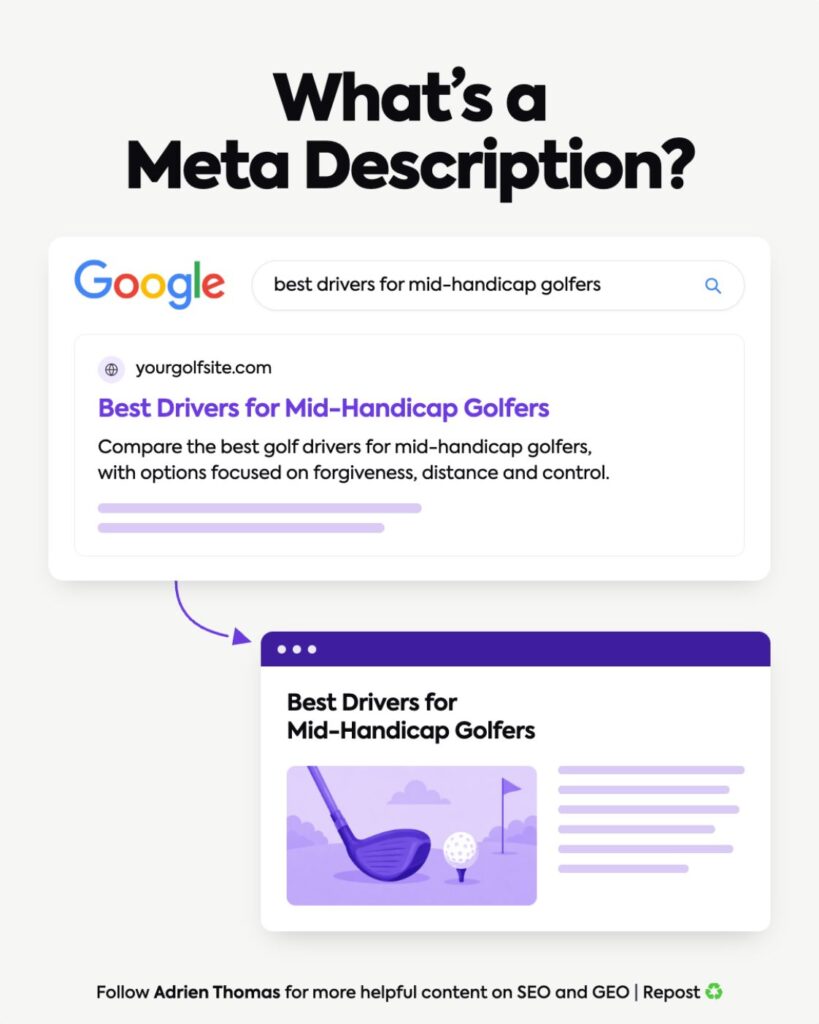
A meta description is a sentence or two of summary text, added to a page’s HTML head, that tells search engines what the page is about. It shows up here:
<meta name=”description” content=”Compare the best golf drivers for mid-handicap golfers, with options focused on forgiveness, distance and control.”>
Visitors never see that line on the page itself. It exists purely for search engines and, sometimes, for the searcher scanning results before they click.
When Google uses it, it becomes the snippet: the line of text sitting under your title in the results page.
Picture someone searching “best drivers for mid-handicap golfers,” landing on a page carrying the meta description above. Google might display it word for word. Just as easily, it might not.
Why Google May Not Use the Meta Description You Wrote
Google treats a meta description as a hint, and hints get overruled.
Its own documentation spells this out: Google builds the snippet mainly from the page’s content, and only reaches for the meta description when that description explains the page better than the content around it does. The whole policy rides on 2 words: “mainly” and “when.”
That framing wasn’t always so direct. Search Engine Journal reported that Google rewrote its snippet documentation in January 2024 to say page content is the primary source. The older wording had implied the meta description came first.
3 independent studies have since measured what that actually looks like, and they land in roughly the same place:
- Ahrefs checked 20,000 keywords, comparing each page’s written meta description against the snippet Google actually displayed. Google rewrote it 62.78% of the time. Only 37.22% of the time did the original text survive.
- Portent ran a similar test across 30,000 keywords and clocked rewrite rates of 68% on desktop and 71% on mobile.
- Semrush’s own figures put Google’s usage rate at around 28%, meaning the other 72% of the time it writes its own.
3 companies, 3 separate datasets, and none of them disagree by much. That kind of convergence across independent research is worth trusting.
The deciding factor is the query. If another paragraph on the page matches the search better than your meta description does, Google uses that paragraph instead. So the same page can show different text depending on what someone typed:
- Type “best drivers for mid-handicap golfers” and your meta description might appear.
- Type “which driver shaft for a 15 handicap” and Google might instead pull a sentence about shaft flex buried 3 sections down, on that exact same page.
The Ahrefs data adds one more wrinkle: length has almost no bearing on any of this. Descriptions that ran too long got rewritten 61.46% of the time. Descriptions of a normal length got rewritten 63.69% of the time. Barely a gap. Query relevance decides the rewrite; character count doesn’t.
Why You Should Still Write One
Given how often Google skips it, writing a meta description might look like wasted effort. 2 things make it worth doing anyway.
First, on the occasions Google does use it, the searcher gets a preview of the page before they commit to the click.
Second, a strong one can shape whether that click happens at all. Google has stated since 2007 that the quality of a snippet influences click-through, and Backlinko’s own research backs that up in practice: pages carrying a meta description see 5.8% more clicks than pages without one. A tight, specific sentence simply outperforms whatever paragraph Google would have pulled at random.
And it costs almost nothing. A few minutes per page, at most.
How to Write a Meta Description That Works
Strip away the advice columns and a working meta description comes down to a handful of habits.
- It describes that one specific page. A description written for the whole site or category doesn’t help here.
- It stays unique. Google’s own guidance flags near-identical descriptions across pages as unhelpful once those pages start appearing near each other in results.
- It names the topic in plain language, with no keyword crammed in for its own sake.
- It gives the reader a specific reason to click, something a plain summary rarely manages.
- It never gets pasted onto 20 other pages to save time.
There’s no secret formula behind any of that. It’s an honest sentence or two, written for whoever’s about to read it.
Meta Description Length: Is There Really a Character Limit?
Google has never published an official character limit, 155, 160, or otherwise. Its documentation is explicit that length isn’t capped. Google truncates a snippet only when it has to, to fit whatever space the device screen allows.
John Mueller, Google’s Search Advocate, was blunt about it on X when someone pushed a client’s 155-to-160 rule as “per Google algorithm.” His reply: “I’m sorry to tell you, those numbers are all made up. Whoever told them to you is leading you astray, probably not just in this regard.”
Even so, the number keeps circulating, mostly because the SEO tools people rely on every day keep repeating it, each with a slightly different figure. Collaborada laid out the mismatch clearly when making this same point:
| Source | Recommended max length | Confirmed by Google? |
| Yoast | 120 to 156 characters | No, a plugin’s own guideline |
| Semrush | Around 135 characters | No, a practitioner estimate |
| Backlinko | ~155 characters desktop, ~120 mobile | No, an observed average |
| Screaming Frog | 70 to 155 characters | No, a tool default |
| Moz / Ahrefs convention | 120 to 160 characters | No, an industry convention |
| Google Search Central | No stated limit | Yes, the only official source |
None of those 5 tools point back to Google as their source, and none of them agree with each other either. For what it’s worth, Semrush’s own data on what actually renders shows an average length of 146.28 characters on desktop and 135.87 on mobile. That’s a description of current behavior, useful context rather than a number to write toward.
The irony is hard to miss: several of the pages currently ranking for “how to write a meta description,” Yoast’s and Semrush’s own guides among them, still hand readers a 155-character target as though Google signed off on it. Google didn’t, and said so directly.
Write for whoever’s reading, and lead with the most useful line first so it still lands if mobile cuts the rest. Time spent counting characters is time not spent improving the sentence.
Are Meta Descriptions a Ranking Factor?
No, and Google confirmed as much back in a September 2009 Search Central post: the description tag might get used for snippets, but it plays no role in ranking. That statement has stood, unchallenged, ever since.
It still belongs on every on-page checklist we run at Crescendo. When Google does show it, the click-through gain is measurable. What it won’t do is push a page to the top spot on its own merits, however well it’s written.
Ahrefs also measured this from the other direction: 25.02% of pages holding a top-10 position carry no meta description whatsoever. Roughly 1 in 4 page-one results is getting by without one.
The 5 Checks Before You Publish

Run through 5 questions before a page goes live:
- Does this description actually match the specific page it sits on?
- Does it tell the reader what they’re about to get?
- Does the main topic come through naturally, without sounding forced?
- Is it different from every other description on the site?
- If Google ignored this description entirely, would the page still produce a decent snippet on its own?
That last question carries the most weight, and it’s the one teams skip most often.
A “no” on question 5 means the real problem sits in the page itself. Google will still lift its snippet from that content, and a page that’s vague or poorly organized hands over a snippet just as weak.
I run into a version of this in nearly every audit: a carefully crafted meta description sitting above content that never actually says, anywhere, what the page is for. Google ignores the polished tag, grabs a sentence from the muddled article underneath, and that’s the version the searcher sees.
Sort the page out first. The description comes after.
How to Check the Meta Description of Any Page
Finding a page’s meta description takes about a minute in Chrome.
- Open the page in question.
- Right-click anywhere and choose Inspect.
- Use the search function to look for: meta name=”description”
- Read the value inside content=”…”.
The line you find will look like: <meta name=”description” content=”Compare the best golf drivers for mid-handicap golfers…”>. That’s the description exactly as it’s written into the page’s code.
What’s sitting in that HTML and what Google actually shows aren’t always the same thing. Search the query and read the live snippet: a mismatch means Google decided a different part of your page matched better.
What This Means for GEO
I’d give meta descriptions the same low priority for AI platforms.
They can hand an AI system a bit of extra context about a page. The model builds its answer from the body content itself: the passages and definitions it can quote directly. A line buried in the head of the HTML rarely makes that cut.
I put it to clients like this:
“For GEO, I wouldn’t overthink meta descriptions. AI platforms rarely quote them directly. What actually gets picked up is a page with clear structure and explicit definitions. If your content never states clearly what it’s about, no meta description fixes that.”
This view comes from working GEO cases at Crescendo, rather than a published study. No one has put out credible numbers on exactly how much weight ChatGPT, Perplexity, or Gemini assign to the meta description tag, and I’d question anyone who tells you they have.
What holds up, from client work, is that a page with a clear structure and a plain definition gets picked up by AI answers regardless of how polished its meta description is. The GEO advice ends up matching the Google advice: write the description, but don’t let the page depend on it to explain itself.
Page First, Description Second
Google itself says the page carries the real weight in building a snippet. That one admission should flip the order most on-page checklists follow.
Here’s the sequence that actually holds up:
- Build the content so that almost any paragraph in it could work as a standalone snippet.
- Only then write a meta description that accurately reflects the page.
- Run it through the 5 checks above, weighting the last one heaviest.
This kind of gap, a page that can’t explain itself without help from a tag in its own head section, is exactly what Crescendo digs into during on-page and GEO audits for clients.
FAQ
What is a meta description?
It’s a sentence or two of summary text added to a page’s HTML head. Google can pull it into search results as the snippet under your title, though nothing forces it to.
Is there a character limit or ideal length for meta descriptions?
Not an official one. Google’s documentation states there’s no cap, and snippets get truncated only to fit available space. The commonly cited 155 to 160 character figure comes from SEO tools and industry habit, rather than from Google. John Mueller has said outright that those numbers are made up.
How do I write a meta description that actually gets used?
Match it precisely to that page, state the topic in plain language, give the reader a real reason to click, and make sure no other page on the site shares the same wording. None of that guarantees Google will use it, but it gives you the best shot.
Are meta descriptions a ranking factor?
No. Google said as much in a 2009 blog post confirming the description tag plays no role in ranking. It can still shape click-through when Google displays it, just not your position.
Do meta descriptions matter for AI platforms like ChatGPT or Perplexity?
They can add a little context. AI platforms pull their answers mainly from body text. No credible public data shows the meta description tag carrying meaningful influence there.