
TL;DR
- An XML sitemap lists the URLs you want search engines to find, usually at a predictable address like sitemap.xml.
- Google says this directly: a sitemap doesn’t guarantee that the URLs inside it get crawled, indexed, or ranked.
- A sitemap and internal linking solve 2 different problems. One helps Google discover pages. The other tells Google which pages matter and how they connect.
- Lean on the sitemap alone and skip internal linking, and your strongest content gets harder to find, for Google and for AI crawlers.
- Submitting a sitemap through Search Console takes minutes, and it’s one input among several.
An XML sitemap doesn’t replace internal linking, and treating it like a substitute is a common mistake. A sitemap hands Google a list of URLs worth checking.
Internal linking does a different job: it tells Google, and AI crawlers, which of those pages actually matter and how they connect to everything else on your site. Skip one for the other and you’re only doing half the work.
What Is an XML Sitemap?
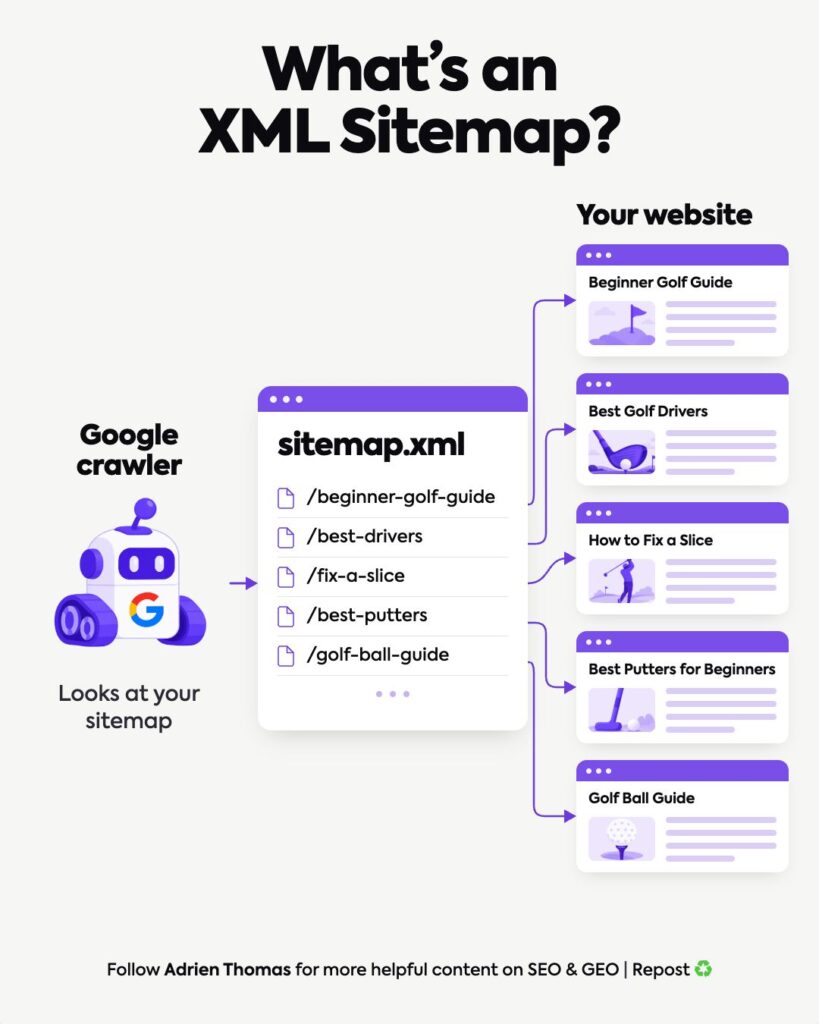
An XML sitemap is a file that lists the URLs you consider important on your website. It usually lives at a predictable address like sitemap.xml. Visitors never see it. It exists for search engines.
Take a golf website as an example. It might have pages like Beginner Golf Guide, Best Golf Drivers, How to Fix a Slice, Best Putters for Beginners, and Golf Ball Guide. The sitemap lists those URLs in one place, along with metadata like when each page last changed.
Instead of Google stumbling onto every page through links alone, the sitemap hands it a direct list to check.
XML sitemaps work the same way regardless of platform or site size. One file, one job.
Google Treats Your Sitemap as a Hint
This is the part most people get wrong. A sitemap only offers a hint. It carries no authority to instruct Google to do anything. Google’s own documentation backs that up: “A sitemap helps search engines discover URLs on your site, but it doesn’t guarantee that all the items in your sitemap will be crawled and indexed.”
Submitting a URL doesn’t guarantee Google will crawl it. It definitely doesn’t guarantee indexing, and it has no bearing on where the page ranks.
Why Use an XML Sitemap Anyway
If XML sitemaps can’t guarantee any of that, why bother? 3 reasons, straight from Google:
- Discovery. On a large or newly launched site, Google’s documentation notes that Googlebot might not find every new page on its own. A sitemap gives it a starting list.
- Crawl efficiency. Google reads the sitemap file to crawl larger or more complex sites more efficiently.
- Freshness. A sitemap can flag when a page last changed, which helps Google spot new or updated content faster.
There’s a technical ceiling worth knowing before you build one. Google’s own sitemap guidelines cap a single file at 50,000 URLs or 50MB, whichever limit hits first.
Cross either one and you need a sitemap index instead, one file that points to several smaller sitemaps, split however makes sense for your site, by content type or by section. Google also asks for UTF-8 encoding and fully qualified URLs. Relative paths don’t work.
One more detail that trips people up. Google has said for years that it ignores the <priority> and <changefreq> tags entirely, a point Yoast’s own sitemap documentation confirms. The <lastmod> tag is the one that still earns its keep.
Why XML Sitemaps Don’t Replace Internal Linking
Your sitemap and your internal links do different jobs.
The sitemap tells Google which URLs exist. Internal links tell Google which pages matter and how they connect. Google’s own link guidance puts it plainly: “Google uses links as a signal when determining the relevancy of pages and to find new pages to crawl.”
The same documentation adds a rule worth building your site around: “Every page you care about should have a link from at least one other page on your site.”
That’s the gap a sitemap can’t close. A page can sit in your sitemap and still look disconnected to Google if nothing on your site links to it internally.
| XML Sitemap | Internal Linking | |
| Job | Lists the URLs that exist | Shows which pages matter and how they connect |
| Signal Google reads | A hint worth checking | Evidence used to judge relevance and find new pages |
| What it can’t do | Show how pages relate to each other | List every URL on the site by itself |
| Guarantee | None. Crawling, indexing, and ranking aren’t promised | None either, but a page with zero internal links reads as low priority |
So you need both. The sitemap helps Google find your URLs. Internal linking helps Google understand how those pages relate, and signals which ones you consider important.
What Belongs in Your Sitemap (and What Doesn’t)
Be deliberate about what you include. Your sitemap should mainly contain:
- Important pages you want indexed
- Canonical URLs
- Current, live pages
Leave out redirected URLs, noindex pages, and any URL you don’t want appearing in Google. A sitemap full of pages you don’t want indexed just adds noise to the list you’re handing Google.
How to Submit a Sitemap to Google

Building the file is half the job. Getting it in front of Google is the other half, and there’s more than one way to do it.
- Host the sitemap at your site root, or wherever you host it, and confirm it loads correctly.
- Reference it in your robots.txt file with a line like Sitemap: https://yoursite.com/sitemap.xml. Google’s documentation says it will pick this up “the next time we crawl your robots.txt file.”
- Submit it in the Search Console Sitemaps report. Paste the URL into the “Add a new sitemap” box and click submit.
- Use the Search Console API if you want to submit sitemaps programmatically, useful if you manage several sites, or large ones.
Search Console fetches the sitemap right away, though Google notes it “can take some time to crawl the URLs listed in a sitemap.” The report then shows a status for each sitemap you’ve submitted: Success, Couldn’t fetch, or a count of errors, along with how many pages it discovered inside the file.
A “Success” status and a healthy discovered-pages count still don’t mean those pages get crawled or indexed. Google says as much directly: submitting a sitemap “is merely a hint: it doesn’t guarantee that Google will download the sitemap or use the sitemap for crawling URLs on the site.” Submission gets your sitemap in front of Google. What Google does with it after that stays out of your hands.
5 Checks Before You Move On
Run through these before you consider your sitemap done:
- Do you have an XML sitemap?
- Does it contain your important pages?
- Does it only contain URLs you actually want indexed?
- Is it updated when pages are added or removed?
- Does every page in it also have an internal link pointing to it?
If you’re not sure whether you even have one, check yourwebsite.com/sitemap.xml or yourwebsite.com/sitemap_index.xml, look inside your robots.txt file, or check Google Search Console directly. Once you know where to check, it doesn’t take long to spot.
What This Means for GEO
This is usually where I stop clients from overthinking things:
“For GEO, I wouldn’t overthink XML sitemaps. They are not a GEO tactic by themselves. But technical discoverability still matters. If your important content is difficult for crawlers to find, you are already making the job harder.”
A sitemap won’t get your brand named in an AI answer. But AI crawlers still have to find and reach your content before anything else about it matters. That baseline discoverability rests on the same 2 basics Google relies on: a sitemap listing what matters, and internal links showing how it all connects. Miss that, and the quality of the content stops mattering. It never gets read.
XML Sitemaps and Internal Links, Doing Different Jobs
Treat the sitemap as a checklist item, skip internal linking, and you’ve solved half the problem at most. A flawless sitemap still won’t help if your best pages sit buried several clicks deep with nothing pointing to them. That’s the signal Google actually weighs, and a sitemap has no way to send it.
If you want a technical read on how discoverable your content really is, for Google and for AI platforms, that’s the kind of on-page and GEO audit Crescendo runs for clients every week.
FAQ
What is an XML sitemap?
An XML sitemap is a file, usually at sitemap.xml, that lists the important URLs on your website so search engines can find them more easily.
Does submitting a sitemap guarantee my pages get indexed?
No. Google’s own documentation states a sitemap doesn’t guarantee that the items in it get crawled or indexed. It’s a hint, and only a hint.
What’s the difference between XML sitemaps and internal linking?
A sitemap gives Google a list of URLs to check. Internal linking tells Google which pages matter and how they relate to each other. They solve 2 different problems, and a site needs both.
How do I submit a sitemap to Google?
Host it at your site root, reference it in your robots.txt file, then add it in the Search Console Sitemaps report, or submit it through the Search Console API. Google fetches it right away, though crawling the URLs inside takes longer.
How do I check if my site already has a sitemap?
Try yourwebsite.com/sitemap.xml or yourwebsite.com/sitemap_index.xml, check your robots.txt file, or look inside Google Search Console directly.