
Key takeaways
- Single-location GBP advice stops working somewhere around your tenth profile. Verification, naming and reviews all change behaviour at scale.
- Bulk verification is available at 10+ profiles for the same business – but only after your data is clean. Google rejects messy spreadsheets.
- Primary category and NAP consistency move rankings more than posting frequency ever will.
- Reviews are routed, not collected. A brand with 800 reviews spread across 40 wrong profiles is worse off than one with 200 in the right places.
- AI assistants answering “best X near me” pull from the same profile and review data you control. Optimize once, get cited in two places.
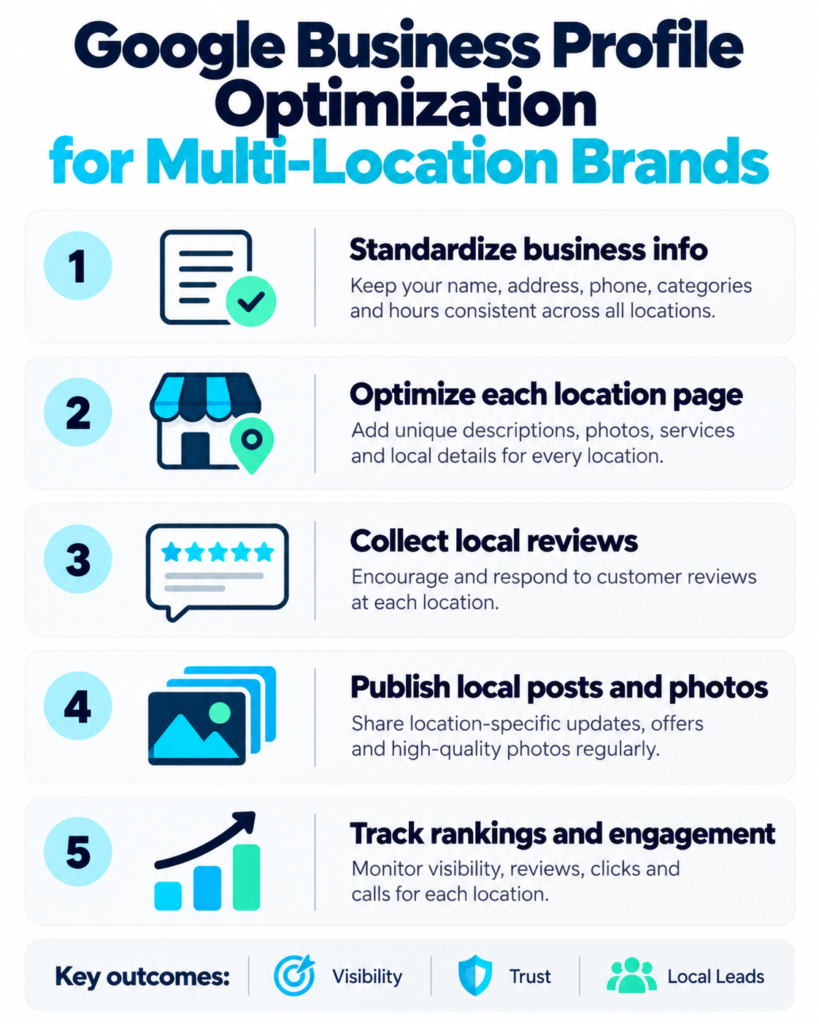
If your brand has one storefront, Google Business Profile optimization is a checklist: fill every field, upload photos, ask for reviews, post now and then.
Add a second location and the checklist still holds. Add twenty and it falls apart. You are no longer editing a profile – you are running a data pipeline, a verification queue, a review triage desk and a support-court appeal process, all at once. This guide is about that operational layer, the part most “local SEO” content skips.
Why Multi-Location GBP Is a Different Problem
For businesses operating in Thailand, a broader SEO agency in Thailand strategy can support multi-location profile optimization.
At one location, a mistake costs you a few clicks. At 200 locations, the same mistake is a brand-wide outage.
Google doesn’t give you a multi-location dashboard that fixes this. You get one profile per location, and each one has to be verified, named, categorised and reviewed independently. The tools help, but the process is yours – and that is the difference between GBP optimization at one store and GBP optimization at 200.
The Three Failure Modes at Scale
Every multi-location account we audit fails in one of three ways.
- Inconsistent data. The legal name is one thing, the storefront sign is another, and the website footer is a third. Google picks one and applies it everywhere – usually the wrong one.
- Unverified locations. A new site opens, nobody claims it, and it sits invisible in Maps for weeks. At 300 locations, five unclaimed profiles a month is normal unless someone owns it.
- Review fragmentation. Reviews land on the nearest profile, not always the right one. A customer who visits your downtown branch leaves a review on a location 4 km away that shares your brand name.
Fix one and the other two get easier. Fix none and every marketing dollar leaks.
What It Costs When It Goes Wrong
The cost isn’t just lost rankings. It’s lost phone calls and direction requests you can measure in GBP Insights.
Here’s the practical chain:
- An unverified profile doesn’t appear on Search or Maps at all – Google is explicit that locations aren’t eligible until verified.
- A wrongly named profile gets suspended, and reinstatement can take weeks.
- A profile with the wrong primary category ranks for the wrong intent, so it attracts browsers instead of buyers.
- Duplicate profiles split your reviews, so no single location looks credible enough to win the local pack.
For a 45-location chain, that’s not a technical problem. It’s lost footfall.
The Foundation: Naming, Categories and Data Consistency
Get these three right before you touch verification. Google’s review teams check data quality first, and a naming violation will sink a bulk request faster than anything else.
The Naming Rule (and Why Franchise Names Break It)
Google’s guidelines for representing your business say the profile name should be the real-world name customers see on your storefront, and that locations in the same country should use the same name unless the real-world name genuinely differs by location.
So this is a violation:
- Acme Plumbing – Springfield
- Acme Plumbing – Austin
And this is fine:
- Acme Plumbing
Franchise systems break this constantly. A franchisee wants to rank for their city, so they append it. An area developer uses a slightly different trading name in one state. A sub-brand gets folded in after an acquisition and never gets reconciled. Each variation looks harmless and each one is a suspension waiting to happen.
The rule we give clients: one brand name, identical across every profile, unless the storefront sign physically differs. If it does differ, document it with a photo before you submit.
Primary Category Selection at Scale
Primary category is the single highest-leverage field on a profile. It tells Google what you are and, more importantly, what queries you’re eligible for.
At scale, two problems show up:
- Cannibalisation. Two nearby locations pick different primary categories, so they compete for different queries and neither dominates.
- Drift. A new regional manager updates a category to match a competitor, and now 12 locations are inconsistent.
The fix is a category matrix: map your business model to one primary category and a defined set of secondary categories, then enforce it. Review the matrix once a quarter – Google adds and retires categories, and a category that was correct last year may now be the wrong one.
If you operate google business profile multi location, this is the field to standardise first. Everything downstream – services, attributes, descriptions – inherits the category decision.
NAP Consistency Across All Locations
Name, Address, Phone. The boring one. The one that breaks verification.
Every location needs one canonical record that drives the profile, the website location page, your insurance paperwork and every third-party citation. When those records disagree, Google has to guess, and guesses cause duplicates.
A workable standard:
- One source of truth. A single sheet or database, owned by one team, with a change log.
- One phone number per location. Call tracking is fine, but the number on the profile should match the number on the landing page.
- Suite numbers formatted identically across every platform (“Suite 4” not “Ste 4” in one place and “Unit 4” in another).
- Change propagation. When a location moves, the profile, the landing page and the top citations change in the same week, not the same quarter.
Bulk Verification and Location Management
How Verification Works for Multiple Locations
Google verifies profiles individually by default – postcard, phone, email or video, depending on the business. At scale that’s unworkable, so Google offers bulk verification for chains.
The entry point is Business Profile Manager on desktop, under Verifications → Chain. Google then reviews your submission and may ask for more evidence. Until the review passes, those locations stay off Search and Maps.
Two things trip people up:
- Duplicates don’t count. Suspended, disabled or duplicate profiles don’t count toward the eligibility threshold.
- Submit everything. Google expects the full set of locations you manage for that business, not a sample.
When to Use Bulk Verification
You can request bulk verification if you manage 10 or more profiles for the same business (Google’s bulk verification guide). Below that, verify individually.
Signs you’re ready:
- Your NAP data is already standardised and matches your website.
- Naming follows the guidelines with no city or keyword suffixes.
- You can list every location in one file without gaps.
- Nobody on the team is mid-rebrand.
Signs you should wait:
- You have open duplicate reports.
- Any location is currently suspended.
- Two departments have different spreadsheets.
Google also documents why bulk verification gets delayed, and the pattern is consistent: data quality. Apply with clean data and the review moves. Apply with a messy file and you’ll spend a month in a support thread.
Managing Locations That Get Suspended
Suspensions are a when, not an if. At 200 locations, expect a handful of flags a year, usually from an address change, a naming edit or a third-party edit you didn’t make.
The response playbook:
- Don’t edit anything else. Pausing changes while you appeal prevents new flags.
- Screenshot the profile first. You need evidence of what it looked like before.
- Identify the likely trigger. Compare the profile against the guidelines field by field.
- Fix the actual violation before you appeal, not after.
- Appeal once, thoroughly. Repeated appeals slow down the review.
For franchise groups, put this in writing and give it to the regional managers. Ad hoc reinstatement requests from eight different people is how a two-week fix becomes a two-month one.
If you’d rather not run this yourself, an AEO services partner or a dedicated local ops team can own the queue.
The Profile Elements That Actually Move Rankings
Not every field is worth equal effort, and at 300 locations, prioritisation is the whole game. Here’s how we rank the fields.
| Element | Impact | Effort | Priority |
|---|---|---|---|
| Primary category | Very high | Low | Fix first |
| Business name | Very high (suspension risk) | Low | Fix first |
| Reviews (volume + velocity) | High | High | Ongoing |
| Photos (real, geotagged, fresh) | Medium-high | Medium | Ongoing |
| Services / menu items | Medium | Low | Batch once |
| Q&A | Medium | Low | Seed once, monitor |
| Attributes | Low-medium | Low | Batch once |
| Hours (incl. holidays) | Low-medium | Low | Seasonal |
| Description | Low | Low | Batch once |
| Posts | Low | High | Deprioritise |
The pattern is deliberate. The two fields that carry suspension risk and ranking weight – name and category – cost almost nothing to fix once and manage badly forever. Posts sit at the bottom because they consume the most labour for the least ranking movement.
Need a step-by-step look at a full profile setup? Semrush walks through the profile elements that matter most for ranking in local search.
Reviews at Scale
Routing Reviews to the Right Location
You can’t move a review. Google doesn’t allow it, and asking doesn’t help. So the only real lever is getting customers to the correct profile the first time.
What works:
- Location-specific review links. Generate the short review URL for each profile and embed it in that location’s receipt, email footer and SMS follow-up.
- QR codes at the point of sale, printed per location. It sounds low-tech. It works.
- Post-service email or SMS triggered by that location’s POS, not a central CRM blast.
- Staff scripts that name the location, so a customer searching “your brand [city]” lands on the right one.
What doesn’t work: one brand-wide review link. That’s how a review for Chicago ends up on your Houston profile.
Responding Without a Central Team
Central response teams produce replies that read like a corporate press release, and Google’s own guidance is to respond professionally. Generic doesn’t read professional.
A hybrid model scales better:
- Central team writes guidelines, owns the tone of voice, and handles anything flagged as a complaint or legal risk.
- Location managers respond to local, operational reviews – the ones about parking, wait times and a specific staff member. They know the context.
- Escalation rules decide what goes where. Anything mentioning injury, discrimination or refunds goes central within 24 hours.
Target a 48-hour response window. After that, the reviewer has moved on and the response is only for the next reader.
What Review Velocity Does to Local Rankings
Google says reviews are part of prominence, alongside mentions and links across the web (ranking guidance). It doesn’t publish a formula.
Practically, we watch three numbers, not one:
- Velocity: new reviews per month, per location. Steady beats spiky.
- Recency: share of reviews from the last 90 days. A profile with 400 old reviews looks dormant.
- Distribution: is every location getting them, or are three flagships carrying the brand?
A store that collected 60 reviews at launch and nothing since will lose ground to one collecting five a month. Don’t buy reviews or incentivise them – Google prohibits it, and a violation is a suspension risk. Ask every customer, every time, and make the link location-specific.
Local Landing Pages and GBP: The Pairing
Your Google Business Profile is the front door. The landing page is the house. If they contradict each other, Google trusts neither.
One Page Per Location (and Why It Must Be Unique)
Every location gets its own URL. Not /locations with a dropdown. Not a filtered view. A real, indexable page.
And it has to be genuinely unique. Swapping the city name in a template across 80 pages is a doorway pattern, and Google has been treating it as one for years. Unique means:
- That location’s address, phone and hours, matching the profile exactly.
- Staff names or team photos where relevant.
- Local detail: the neighbourhood, nearby landmarks, parking, transport.
- Reviews from that location, pulled in.
- Location-specific services or stock.
If you’re running local seo multi location, this is where content budget goes. And local SEO at scale is really a governance problem – who owns the template, who approves copy, who checks that page 47 actually got published. One strong page per location outperforms fifty thin ones.
Internal Linking Between Locations
Location pages get orphaned fast. They sit three clicks deep with no internal links pointing at them.
A simple structure that works:
- Homepage links to a locations hub.
- Locations hub lists every location with descriptive anchors (“Plumbing services in Springfield”), not “click here”.
- Each location page links to sibling locations in nearby cities, and back to the hub.
- Service pages link to the location pages where that service is offered.
Keep anchors natural and vary them. If every link says “Springfield plumber”, that reads as manipulation, not navigation.
Schema for Multi-Location Businesses
Google’s LocalBusiness structured data guidance is clear: define each location as its own LocalBusiness, use the most specific accurate subtype, and don’t describe several branches as one business with a list of addresses.
In practice:
- Put
LocalBusiness(or a specific subtype likeDentistorRestaurant) on each location page, with that branch’s own name, address, phone, coordinates and hours. - Put
Organizationon the homepage for the parent brand. - Use a stable
@idper location so the entity stays consistent. - Match the markup to the visible page content. Markup that describes things not on the page is a policy violation.
Test every template with the Rich Results Test and the Schema Markup Validator before you roll it out. One broken template multiplied by 200 pages is a lot of cleanup.
Structured data makes a page eligible for rich results. It doesn’t guarantee them, and it isn’t a ranking shortcut.

GBP and AI Search
How AI Assistants Answer “Best X Near Me”
Local queries increasingly resolve in an AI surface. Google can show an AI Overview alongside the map pack, and AI Mode returns a conversational answer that may name a few businesses and link to their profiles rather than the full list (Google Maps help).
The important detail for brands: being mentioned isn’t the same as being linked, and the businesses named in an AI answer aren’t always the businesses in the top three of the map pack.
The overlap is still large. AI answers lean on the same signals – location, category, hours, ratings, review text – because that’s the structured data available to them.
Want to see how your profile feeds AI visibility? Our team shows how to optimise a Google Business Profile for ChatGPT and Google AI Overviews, including structured information, reviews and real-time signals.
Why Review Content and Category Data Feed AI Answers
When someone asks an assistant for a Korean restaurant open late in a specific neighbourhood, the assistant needs structured facts plus qualitative detail. Your profile supplies both.
- Category and attributes answer “what is this and does it fit.”
- Hours answer “is it open now.”
- Review text answers “is it good at the thing I care about” – the reviews that mention “quiet enough to work” or “kids’ menu” get pulled into answers that a star rating alone can’t satisfy.
This is the practical bridge between GBP work and generative visibility. Optimizing the profile is not just a maps play anymore; it’s how you get into the source set the model reads.
If your team is separating local SEO from AI visibility work, stop. They’re the same pipeline.
Tracking Local AI Visibility
Local pack rank tracking won’t tell you whether an assistant is recommending you. You need a second measurement layer.
Track these:
- Prompt sets per market. “Best [category] in [neighbourhood]” across your top 10–20 cities, run on a schedule.
- Citation share. How often each location is named, and whether your site or the profile is the source.
- Sentiment framing. If the assistant describes your brand as “cheap and busy” versus “reliable”, that’s a positioning problem you can act on.
- Answer volatility. Run the same prompt weekly; changes reveal which signals are shifting.
Tools built for this are still maturing. Clairon is one we use for tracking how brands surface across AI assistants, and our guide to how to track AI traffic covers the analytics side once visitors arrive. Start with the GEO audit checklist if you need a baseline before you build the reporting.
Use Case 1 – 45-Location Retail Chain Fixes Verification and Gains 31% More Direction Requests
A regional retail chain came to us with 45 stores, a new website, and a mess.
What we found:
- 12 of 45 profiles were unverified or hidden after a domain migration broke the email addresses Google had on file.
- NAP mismatches on 30 profiles – old suite numbers, three disconnected phone numbers, two trading names.
- Zero review responses in 14 months. 3,100 reviews. 41 replies.
- Primary category varied across four different values, with six stores categorised as a completely unrelated retail type.
What we did, over 90 days:
- Rebuilt a single source-of-truth sheet, deduplicated it against the live profiles.
- Standardised naming to one brand name – no city suffixes, no legacy trading names.
- Fixed NAP across all 45 profiles plus the top 20 citations per location.
- Set one primary category and a short, defined secondary set for every store.
- Recovered the 12 hidden profiles, eight of them within six weeks of the first fix.
- Introduced location-specific review links and a 48-hour response target.
What changed: direction requests across the estate rose 31% over 90 days, with the strongest lift in the 12 recovered locations. Unverified profiles dropped to zero. Review responses went from 1% to 78% of new reviews.
The lesson: none of this was clever. It was boring data work, done once, in the right order. Verification was the bottleneck, and the fix was consistency, not a new tool.
Figures are from that engagement and are illustrative of the workflow, not a guarantee.
Use Case 2 – Franchise Brand Loses Rankings After a Rebrand (and How It Recovered)
A 60-franchise services brand rebranded. New name, new logo, new website, new headquarters. Six weeks later, local visibility collapsed.
The damage:
- Every franchisee had appended their city to the new brand name – “NewBrand Plumbing – Austin” – which violates the naming guidelines.
- 23 profiles were suspended for name violations within two months.
- The brand’s old name had been stripped from profiles overnight, taking its review history and ranking signal with it.
- The corporate site redirected the old location URLs to a new
[city]template with nearly identical copy across 60 pages.
The recovery, over four months:
- Removed every city suffix. One brand name, every profile, matching the storefront signage.
- Standardised descriptions and services language while the profiles were frozen.
- Submitted reinstatement requests in waves of 10 with photographic evidence of signage at each location.
- Rebuilt location pages with genuine local content – staff, neighbourhood, service radius – and added per-location
LocalBusinessschema. - Reclaimed the old-name citations and pointed them at the new pages rather than deleting them.
The outcome: the first 23 suspended profiles were reinstated across seven weeks. Local pack visibility recovered to roughly 85% of pre-rebrand levels within four months, and branded search returned to baseline faster than non-branded. The remaining gap was closing ~5 points a month.
The lesson: rebrands break local visibility because they break consistency. If you’re renaming a multi-location brand, plan the profile migration as carefully as the website one, and never let franchisees improvise their own names.
Figures are from that engagement and are illustrative.
How Crescendo Handles Multi-Location Visibility
We treat local and AI visibility as one system, because that’s how Google reads it.
Our engagement model for multi-location brands:
- Discovery and audit. Full profile inventory, NAP reconciliation, naming and category compliance check, verification status map.
- Foundation rebuild. Source-of-truth data, naming standardisation, category matrix, bulk verification submission.
- Review operations. Location-specific routing, response frameworks, escalation rules, velocity targets.
- Location pages and schema. One unique page per location,
LocalBusinessmarkup, internal linking structure. - AI visibility tracking. Prompt sets per market, citation share, sentiment, and connection to traffic analytics.
- Reporting. Direction requests, calls, local pack position, AI citation share – one dashboard, not five.
We run AEO services for brands that need generative visibility alongside local, and we hand teams the GEO audit checklist when they want to self-serve the first pass.
Crescendo’s Take
Four opinions we’ve earned the hard way.
The element we’d fix first across 100 locations: primary category. Not reviews, not photos. Category determines which queries you’re even eligible for, it takes a day to standardise, and it’s the cheapest ranking win available. Fixing it on 100 profiles costs less than fixing it on 10 landing pages later.
Why we tell clients to stop posting to GBP weekly. Post frequency isn’t a documented ranking factor, and Google’s own local guidance lists relevance, distance and prominence – not posting cadence. At 200 locations, weekly posts are 10,400 posts a year of labour for almost no rankings movement. Post when you have something real: an offer, a closure, a new service. Spend the saved hours on category hygiene and review velocity.
What most multi-location brands get wrong about reviews. They treat it as a reputation problem when it’s an operations problem. One brand-wide review link, a central team writing bland replies, and no accountability at the location level. Fix the routing and the rest follows. If reviews keep landing on the wrong profile, you have a plumbing issue, not a PR issue.
How local AI visibility differs from local pack rankings. The map pack is a ranked list, so you can be third and still be visible. AI answers are a selection – one or two businesses named, often with a sentence of reasoning. That shifts the goal from “rank” to “be the obvious answer,” which rewards clear category signals, rich review content and consistent entity data far more than proximity alone. Ranking third in the pack might get you a tap. Being the named recommendation gets you the customer.
FAQ
How many locations do I need before I can bulk verify?
Google allows bulk verification requests when you manage 10 or more profiles for the same business. Duplicate, suspended or disabled profiles don’t count toward the minimum, so clean up duplicates first. Agencies managing multiple unrelated businesses in one account can’t bulk verify them together.
Can I add a city name to my location’s business name to rank locally?
No. Google’s guidelines say to use the real-world name customers see on your storefront, and to keep it the same across locations in the same country unless the real-world name genuinely differs. “Brand Plumbing – Austin” is a violation and a suspension risk. You rank for the city through your landing page, categories, reviews and proximity, not the profile name.
Should every location use the same primary category?
Yes, unless the locations genuinely operate different business models – for example, a location that’s a distribution centre versus one that’s customer-facing retail. Build a category matrix with one primary and a defined secondary set, and review it quarterly. Cannibalisation between nearby locations is usually a category problem, not a content problem.
A review landed on the wrong location. Can I move it?
No. Google doesn’t transfer reviews between profiles, and there’s no workaround. Respond to it on the profile where it sits, then fix the routing – location-specific review links, per-location QR codes and POS-triggered follow-ups. Routing is the only reliable control you have.
Do GBP posts still help with rankings?
Google’s published local ranking guidance covers relevance, distance and prominence, and doesn’t list posting frequency as a factor. Posts can influence clicks and conversions once someone finds the profile, so post when you have something useful. Just don’t treat weekly posting as a ranking lever, especially across hundreds of locations.
How do multi-location brands show up in AI search?
AI answers and AI Mode pull from the same underlying data – category, hours, attributes, ratings and review text – plus your website. Get mentioned more often by keeping profile data consistent across every location, building genuinely unique location pages with LocalBusiness schema, and generating steady review volume that mentions specific services and qualities. Then track citation share per market, because map pack position alone won’t tell you whether an assistant is naming you.